Skip to features

Private iOS beta · build 108

One app for every board.
Analysis down to the hold.

Omni runs Kilter, Tension, MoonBoard and gym spray walls from one logbook. It records every send and attempt by hold, so you can see which holds limit you and choose climbs that work on them.

KilterTensionMoonBoardSpray walls

Every clip and screenshot on this page is a simulator capture of the Omni beta with demo data.

Simulator captures · demo data

What Omni does

Every send and attempt, recorded by hold.

Omni stores the climb, the result and which holds each send and attempt used, on every supported board. That record is what makes per-hold analysis, a strengths-and-weaknesses comparison and targeted recommendations possible.

One logbook across boards

Sends and attempts on Kilter, Tension (including TB2 Mirror), MoonBoard and spray walls are one history. A plateau that per-board grades hide shows up in per-hold data.

Per-hold analysis

Send rate by hold, heatmaps by board and angle, and a hold-usage chart by grade. Strengths and weaknesses are derived from your own records and feed recommendations.

Climbing with others

Board parties with a shared queue and turns that rotate on their own. Shared playlists and filters with upvotes. A forum whose threads feed the roadmap.

Every board Hold rules saved with filters

Hold-based search.

Select holds on the board and set their role: hand, foot, start or finish. Omni returns every catalog climb that uses them in that role, with a live match count, from the server or from a local archive when offline. A grade range, hand-matching rule or verified-only filter can be added and the whole search saved.

How it improves your climbing: a weakness is usually a hold type or a move, not a grade. Searching by hold turns one problem hold into a session of climbs that use it.

  • Hold rolesHand and foot are separate rules, so a crimp used as a hand and the same crimp used as a foot are different searches.
  • Live match countUpdates as holds are added or removed, so a session can be widened or narrowed before it is run.
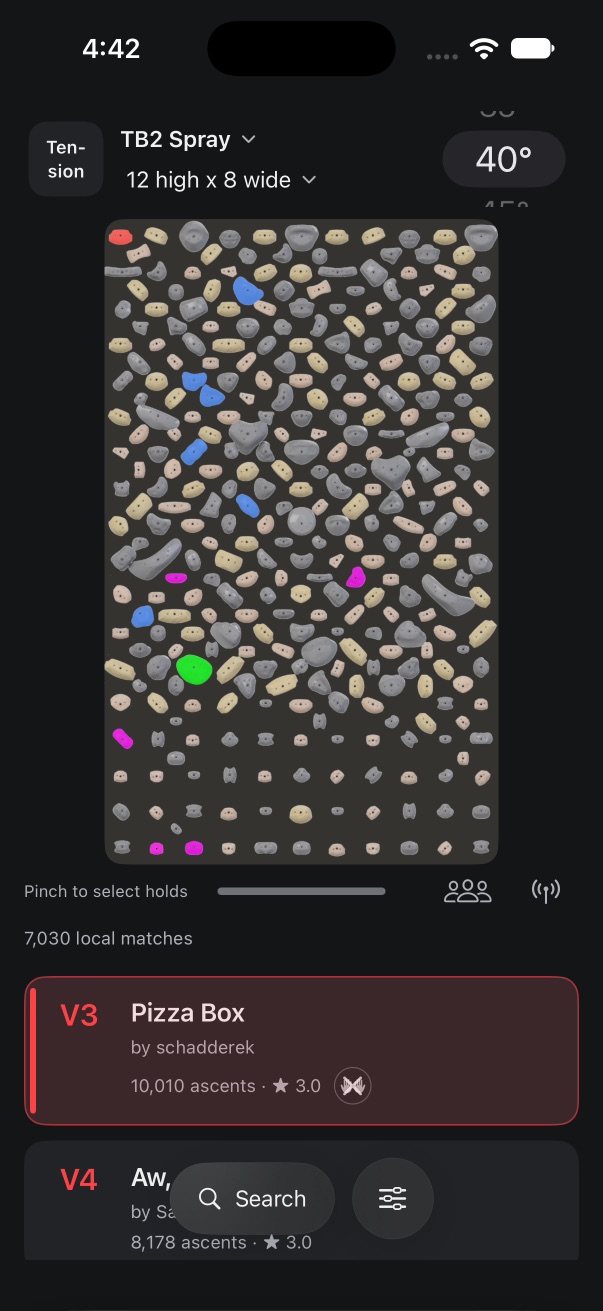
Hold search · simulator capture
Pin, share, follow

Saved filters, sharing and alerts.

A saved filter stores the grade range, angle, hand-matching rule and hold rules together. It can be named, pinned to the filter menu, shared as a link that opens as a working search, and followed for notifications when new climbs match.

How it improves your climbing: training a weakness means repeating the same constraint over several sessions. A saved filter makes the constraint reproducible; an alert extends it as setters publish new climbs.

  • Presets keep hold rulesThe hold selection and roles are saved with the grade range, not separately.
  • Shared filtersA shared filter opens as a working search on the recipient’s phone. Published filters are upvoted in Community.
  • New-climb alertsFollow a filter and Omni notifies you when a newly published climb matches it.
Saved filters · simulator capture
Sends and attempts, by hold

Analysis by hold.

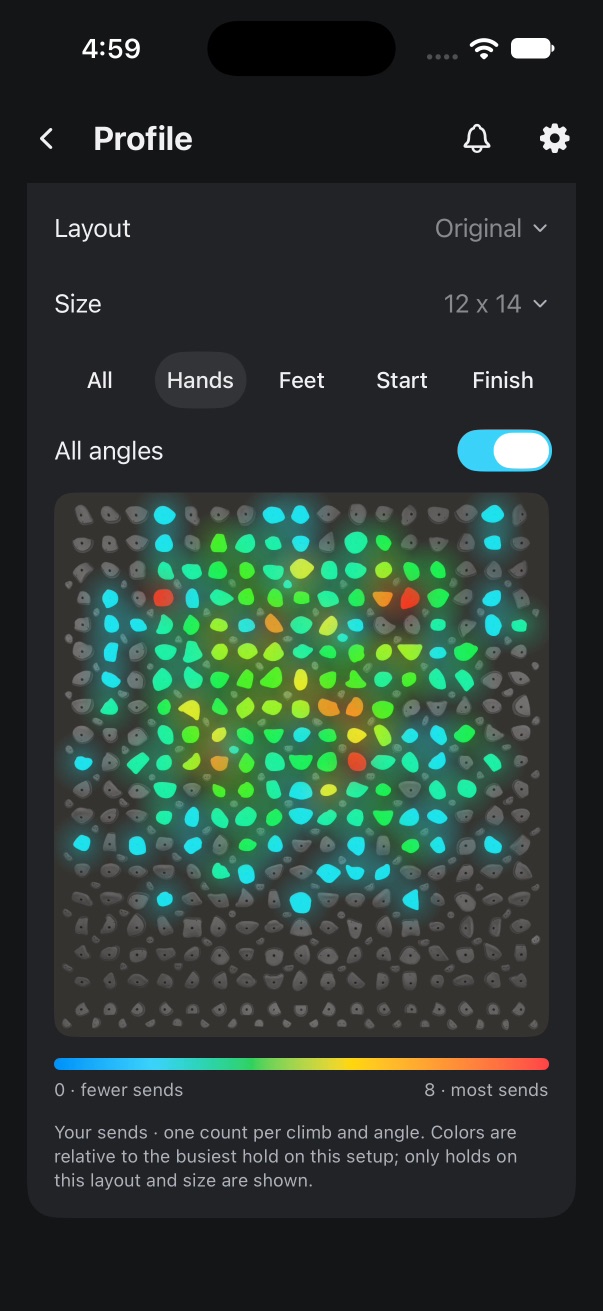
Omni records which holds each logged send and attempt used. It maps them as a heatmap per board, layout and angle, and compares your send rate per hold with the climbs you attempt. A hold-usage chart shows how often each hold appears at each grade.

How it improves your climbing: holds with a low send rate relative to attempts are weaknesses; holds with a high rate are strengths. Recommended climbs and For You use that comparison to pick climbs; For You groups them in categories, and opening a climb steps through its category in Focus. The analysis describes your records; it does not predict a grade.

  • HeatmapsPinch to zoom, tap a hold for its count. Filter by role, layout and angle. Spray-wall sends are mapped too.
  • Strengths and weaknessesSend rate per hold against attempts. Weak holds are drawn red, strong holds green, on the board you climb.
  • Recommended climbs and For YouRecommendations select climbs that use your weak holds. For You combines climbs across boards and angles and adds climbs rising in popularity.
  • Hold usage by gradeA likelihood chart by grade, angle, board and layout with a grade slider: it shows which holds appear more often as grade rises, that is, what a target grade demands.
Analysis · simulator capture
Every board Long-press a climb

Focus: scrubber, measuring, similar climbs.

Long-press a climb to open it full screen. The power scrubber steps through the holds in sequence, the measuring tool gives the distance between two holds, and up to three similar climbs are listed.

How it improves your climbing: reading the sequence first reduces wasted attempts; the distance tells you whether a move is a reach or a jump for your span; similar climbs give a progression in the same style.

  • Power scrubberDrag to step through the holds in order, forwards or back.
  • Hold measuringA ruler between any two holds, in the unit you choose.
  • Swipe to logOne swipe on the card or in Focus logs a send or an attempt. Attempts matter: send rate per hold needs them. History is a playlist you can filter.
Focus · simulator capture
Swipe to log · simulator capture
Shared queue, turns, Live Activity

Board parties.

One board, one queue, no administrator. Anyone starts a party and shares a five-letter code or an Omni QR code; friends join, climbs go into a shared queue, and the board lights the next climb on each turn. Anyone in the party can invite friends, take over the board and end the party; turns rotate on their own. The current turn is shown in the Dynamic Island and a Live Activity.

How it improves your climbing: turns that rotate on their own keep rest intervals consistent and remove negotiation over the controller. Each climber’s attempts and sends are logged to their own account, so group sessions still produce per-hold data.

SamStarts the party, shares the code, climbs first.
JoJoins with the code, queues a climb.
KaiJoins, then shares the QR code.
RaeJoins, then takes a turn.

Parties work without broadcasting, so anyone can share the code before connecting the board. Compact party controls float over any screen; a haptic cue marks your turn. Parties run by a gym’s kiosk keep their staff controls. The four clips are simulator captures with demo accounts, recorded as one session on a build that still asked the party’s starter to approve joins; that step is gone.

Every board Custom LED colors, spray walls

Every board, one app.

Kilter, Tension and MoonBoard boards, and spray walls scanned by a gym. Board switching, board resizing and Bluetooth connection with quick-connect favorites are on the main screen.

How it improves your climbing: climbers who train on more than one board get one record instead of three. Per-hold analysis then covers everything you climb.

  • TB2 MirrorMirror view displays and logs the mirrored layout; excluded Tension holds are drawn in amber, so each log is attributed to the correct layout.
  • LED colorsChoose LED colors per hold role on any RGB board, with a live preview. Press and hold a climb to light it briefly for comparison.
  • Spray walls from a photoGym administrators create a wall on the device: Photo → Straighten → Scan → Fix → Details. Uncertain holds are flagged for review, a tap adds a hold the scan missed, and after a reset a new photo is matched to the wall so every hold that stayed keeps its climbs. Spray routes are then searched, logged and analyzed like any board, heatmaps included. Scanning is experimental.
Omni is an independent app and is not affiliated with, endorsed by, or sponsored by Kilter, Tension Climbing, or Moon Climbing. All trademarks belong to their respective owners.
Tension TB2 spray layout in Omni
Board switching is in the clip at the top · simulator capture

Supported boards

Every supported board, by brand.

Each layout the app carries today, with its sizes and angles as the catalog lists them. Open a brand to see its boards.

Kilter
  • OriginalSizes: 12 × 14 (Commercial), 8 × 12 (Home), 12 × 12 with kickboard (Square), 7 × 10 (Small), 12 × 12 without kickboard (Square), 16 × 12 (Super Wide) · Angles: 0–70° in 5° steps
  • HomewallSizes: 7 × 10 (Full Ride LED Kit), 7 × 10 (Mainline LED Kit), 7 × 10 (Auxiliary LED Kit), 10 × 10 (Full Ride LED Kit), 10 × 10 (Mainline LED Kit), 8 × 12 (Full Ride LED Kit), 8 × 12 (Mainline LED Kit), 10 × 12 (Full Ride LED Kit), 10 × 12 (Mainline LED Kit), 10 × 10 (Auxiliary LED Kit) · Angles: 0–70° in 5° steps
Tension
  • TB1Sizes: Full Wall · Rows: KB1, KB2, 1-18 Columns: A-K, Half Kickboard · Rows: KB2, 1-18 Columns: A-K, No Kickboard · Rows: 1-18 Columns: A-K, Short · Rows: 1-15 Columns: A-K, Short & Narrow · Rows: 1-15 Columns: B.5-I.5 · Angles: 0–70° in 5° steps
  • TB2 MirrorSizes: 12 high × 12 wide, 10 high × 12 wide, 12 high × 8 wide, 10 high × 8 wide, 12 high × 16 wide · Angles: 0–70° in 5° steps
  • TB2 SpraySizes: 12 high × 12 wide, 10 high × 12 wide, 12 high × 8 wide, 10 high × 8 wide, 12 high × 16 wide · Angles: 0–70° in 5° steps
MoonBoard
  • 2016Standard · A–K / 1–18 · Angles: 25°, 40°
  • 2017Standard · A–K / 1–18 · Angles: 25°, 40°
  • 2019Standard · A–K / 1–18 · Angles: 25°, 40°
  • 2024Standard · A–K / 1–18 · Angles: 25°, 40°
  • Mini 2020Mini · A–K / 1–12 · Angles: 40°
  • Mini 2025Mini · A–K / 1–12 · Angles: 40°

Layout, size and angle names follow the app’s catalog. Check that your board’s layout and installed holds are available before relying on a catalog.

Playlists, filters, forum

Community and the forum.

Shared playlists and filters are in one Community tab with upvotes and comments. Verified benchmarks are endorsed by named climbers. The forum is a threaded feed for feature requests, bug reports and discussion about the app; the resolved tickets listed further down came from it.

Shared playlists and filters

Publish a playlist or a filter, upvote, comment, and open any shared climb in Focus. Admin-curated playlists and verified benchmarks are kept separate from user lists.

iOS betaWeb app

The forum

A threaded feed in the Community tab for discussing improvements to Omni, with sorting, reporting and admin moderation. Requests become tickets in the public tracker shown below.

iOS beta

Profiles, friends and verified setters

Friends, activity status and climb visibility with privacy controls. Setters verify their Kilter, Tension or Moon account by publishing a generated climb and get a badge. Share your profile with a link or QR code.

iOS beta

Widgets, Control Center, Live Activity

Interactive Home Screen widgets and Control Center controls for the current climb and party, and a Live Activity for whose turn it is. They follow your colorway.

iOS beta

For You, across boards

Combines climbs across boards and angles, adds climbs rising in popularity, and uses your weaknesses analysis to rank them.

iOS beta

Kiosk mode for gyms

Gym accounts can run Omni on an iPad at the wall, with a layout made for a shared screen.

iPadOSGym accounts

Colorways

Rep a crag.

Pick a colorway and every screen and widget follows it. The classics keep neutral surfaces; the crags are named after bouldering areas and tint the app with their colors. A chosen crag is shown on your profile.

Try them here. This changes this page only; your account and app settings stay as you set them.

Nine of the app’s colorways are shown here. The app has more than thirty, each in light and dark.

Private iOS beta

iOS beta.

Build 108 is available in the Omni Private Beta through TestFlight. Access is by invitation; installing TestFlight alone does not add you to the beta.

Already invited? Open your TestFlight invitation to see the current build. For access or account questions, contact Omni support.

Availability verified 21 October 2026. This is a private beta, with ongoing testing and changes.

Recent in the beta

Builds 84 to 108

  • Less hold editing on spray wallsIn the Fix step one tap removes a hold, an eraser clears a whole patch, and tapping a bare spot while setting a climb adds a hold the scan missed. After a gym reset, a new photo is matched to the wall so every hold that stayed keeps its climbs, and big walls are checked part by part.
  • For You on real boardsEach card shows the climb on its own board artwork with the holds in their real outlines, every category says what it picks, and a sideways swipe scrolls the row instead of turning the page.
  • For You in categoriesRecommendations are grouped into categories of large cards. Opening one steps through its category in Focus, and the set is kept as a read-only Recommended playlist that can be copied and edited.
  • Forum moderation and tab barsPosts and replies can be reported; administrators pin, close and remove with a stated reason. Every tab bar uses one sliding selection, and search swipes away from its top bar.
  • Spray walls in analysisSpray-wall sends appear in personal and community heatmaps, and spray routes reuse the hold compass and the board filters.
  • Smoother partiesJoin by QR or code in one step, draggable party controls that snap to the edges, a haptic cue when your turn starts, and fixes for turn order and the queue.

From the resolved tickets for those builds; several were raised in the Community forum.

From the tracker

Updates from the tracker.

Tickets from Omni’s tracker that reached the private beta since build 84, listed by build. Open tickets with work in a verified build are listed by id only; the rest are counted.

As of : build 108 is available in TestFlight.

  • 266tickets resolved
  • 58resolved since build 84
  • 31open tickets partly in a build
  • 71open, in progress or awaiting information
  1. Build 108

    Available in TestFlightVerified 21 October 2026
    • OMNI-152Partly in this build · ticket open
    • OMNI-090Partly in this build · ticket open
    • OMNI-085Partly in this build · ticket open
  2. Build 107

    Available in TestFlight
    • OMNI-222Partly in this build · ticket open
  3. Build 106

    Available in TestFlight
    • OMNI-307Partly in this build · ticket open
  4. Build 105

    Available in TestFlight
    • OMNI-310Partly in this build · ticket open
    • OMNI-309Partly in this build · ticket open
    • OMNI-308Partly in this build · ticket open
    • OMNI-306Partly in this build · ticket open
  5. Build 104

    Available in TestFlight
    • OMNI-179Partly in this build · ticket open
  6. Build 99

    Available in TestFlight
    • Fix blank wall-photo previewOMNI-237 · Spray walls
    • Restrict wall creation to Plus/Pro with tier limitsOMNI-219 · Spray walls
  7. Build 98

    Available in TestFlight
    • Use dots at ruler endpointsOMNI-305 · Board tools
    • Recommended climbs as their own playlistOMNI-303 · Community
    • Swipe down from a top bar to dismiss searchOMNI-302 · Search
    • Sliding selection animation on every tab barOMNI-300 · Design
    • Open community climbs in category-scoped FocusOMNI-287 · Discovery
    • Categorised, more dynamic For You pageOMNI-286 · Discovery
    • OMNI-301Partly in this build · ticket open
    • OMNI-229Partly in this build · ticket open
    • OMNI-181Partly in this build · ticket open
    • OMNI-162Partly in this build · ticket open
  8. Build 97

    Available in TestFlight
    • Reddit-style threaded comment layoutOMNI-297 · Community
    • Choose default board and reorder coloured board tilesOMNI-288 · Boards
    • Forum naming, profile photos and profile navigationOMNI-233 · Community
    • Use a thumbs-up icon for upvotesOMNI-232 · Community
    • OMNI-275Partly in this build · ticket open
    • OMNI-239Partly in this build · ticket open
    • OMNI-221Partly in this build · ticket open
    • OMNI-186Partly in this build · ticket open
Builds 84 to 96 (51 tickets)
  1. Build 96

    Available in TestFlight
    • Clear usage-data wording and first-login consent choiceOMNI-296 · Privacy
  2. Build 95

    Available in TestFlight
    • OMNI-304Partly in this build · ticket open
  3. Build 94

    Available in TestFlight
    • Pin spray walls to board switcher with gym logosOMNI-295 · Spray walls
    • Make spray-wall home a community climb listOMNI-294 · Spray walls
    • Dim unused spray holds and glow route holds by roleOMNI-293 · Spray walls
    • Use available screen width for spray-wall diagramsOMNI-292 · Spray walls
    • Remove private-backup control from spray-wall screenOMNI-290 · Spray walls
    • Back navigation in spray-wall setupOMNI-289 · Spray walls
    • OMNI-291Partly in this build · ticket open
    • OMNI-183Partly in this build · ticket open
  4. Build 93

    Available in TestFlight
    • Overhaul the GitHub READMEOMNI-227 · Documentation
  5. Build 92

    Available in TestFlight
    • Reuse system-board results and filters for spray wallsOMNI-242 · Spray walls
    • Reuse hold compass for spray routes and hold searchOMNI-241 · Spray walls
  6. Build 91

    Available in TestFlight
    • Spray-wall heatmaps in personal and community analysisOMNI-240 · Spray walls
  7. Build 90

    Available in TestFlight
    • Fix History playlist navigation and match feed cardsOMNI-254 · Playlists
    • Modernise playlist menus throughout OmniOMNI-252 · Playlists
    • Combine For You climbs across boards and anglesOMNI-247 · Discovery
  8. Build 89

    Available in TestFlight
    • Clarify dual grade-scroll wheelsOMNI-267 · Filters
    • Modernise notification menuOMNI-263 · Notifications
    • Compact colour and appearance menus with previewsOMNI-261 · Appearance
    • Live LED colour preview and Appearance placementOMNI-260 · Appearance
    • Modernise edit-log menuOMNI-259 · Logs
  9. Build 88

    Available in TestFlight
    • Add attempt to mini party controls and remove main QueueOMNI-284 · Board parties
    • Fix stale Home Screen widget climb and party controlsOMNI-283 · Widgets
    • Show broadcasting state on Focus buttonOMNI-282 · Broadcasting
    • Move party board settings above leave/end actionsOMNI-281 · Board parties
    • Power scrubber follows finger smoothlyOMNI-279 · Focus mode
    • Strong haptic cue when party turn startsOMNI-278 · Board parties
    • Reveal swipe-card actions with coloured segmentsOMNI-277 · Climb cards
    • Limit Focus recommendations to three climbsOMNI-266 · Focus mode
    • Make Add friend icon larger and clearerOMNI-262 · Profiles
    • Smooth draggable party controls with edge snappingOMNI-257 · Board parties
  10. Build 87

    Available in TestFlight
    • Party climb preview opens FocusOMNI-280 · Board parties
    • OMNI-276Partly in this build · ticket open
    • OMNI-265Partly in this build · ticket open
  11. Build 86

    Available in TestFlight
    • Keep Broadcast visible and simplify party buttonOMNI-274 · Board parties
    • Remove rappelling icon beside profile statusOMNI-273 · Profiles
    • Fix removing climbs from party queueOMNI-272 · Board parties
    • Focus Broadcast opens broadcast controls directlyOMNI-271 · Board parties
    • Fix board stuck with many lit holdsOMNI-270 · Board parties
    • Render white LEDs in board previewOMNI-258 · Boards
    • Fix party turn advancement and group climbs by climberOMNI-224 · Board parties
    • Remove party-start board animationOMNI-214 · Parties
  12. Build 85

    Available in TestFlight
    • Broadcast each climb while browsing FocusOMNI-269 · Broadcasting
  13. Build 84

    Available in TestFlight
    • Allow board connection from within a partyOMNI-268 · Board parties
    • Reduce spacing below the power scrubberOMNI-256 · Layout
    • Join parties directly with QR or five-character codeOMNI-255 · Board parties
    • Suppress dismissed incompatible-board notice until board changesOMNI-253 · Boards
    • Icon-only press-and-hold temporary previewOMNI-251 · Boards
    • Undo automatic playlist add when reselecting destinationOMNI-250 · Playlists
    • Intermittent previous/next climb failure in FocusOMNI-249 · Focus mode

States follow the tracker: available means the build was verified in TestFlight; partly means an open ticket already has work in that build; 10 server or website fixes without a build number are counted as resolved. Generated from the tracker export, not a live connection.

Before your session

Access, boards and your records.

Can I use Omni in a browser?

Yes. The web app has board search, your activity, playlists, analysis and parties. Lighting a board, Focus mode, widgets and the party controls on the lock screen need the iPhone app.

Which boards are supported?

Kilter, Tension and MoonBoard, with the layouts, sizes and angles listed under Supported boards above, plus spray walls created by gym administrators. Check that your board’s layout and installed holds are available before relying on a catalog. Omni does not cover every manufacturer configuration.

Does the analysis predict my grade?

No. Heatmaps, send rates per hold and the strengths-and-weaknesses read describe your recorded sends and attempts. Recommendations use them to pick climbs worth trying; they make no promise about what you will send.

Is my logbook public?

Your logbook, saved climbs and private playlists stay private. Activity status, friends list and climb visibility have their own privacy controls. Sharing a playlist or a filter is a separate, deliberate action.

Who can create spray walls?

Gym administrators. Photo scanning runs on the device and is experimental: flagged holds need review and correction, and it makes no accuracy promise. Climbers can then climb, log and analyze spray-wall routes like any other board.

How do I get beta access?

The iOS beta is invitation-only. Existing testers use their TestFlight invitation; for access questions contact support. Omni is not on the App Store yet.

Are the clips on this page real?

They are recordings of the Omni beta running in the iOS simulator, with demo accounts and demo data, lightly compressed for the web. Screens change between builds; the build you install may differ.

Screen

Enlarged screenshot

Simulator capture with demo data.

Settings

Appearance and grades

Language and appearance are saved on this desktop.